
OpenAI-compatible API explained: one key for 69 models

By Bharath, Engineer
· 10 min read

You built something on the OpenAI API. Maybe you want to try Claude Sonnet 5.5 or DeepSeek V3.2. Maybe you want to stop paying list price. Either way, you don't want to rewrite your stack.
That's the whole point of OpenAI-compatible APIs. Any service that supports the same request format and endpoint paths as OpenAI will work with your existing SDK code after two changes. No new client, no new authentication flow, no new response parsing.
Bearer Club is one of those services. One API key gives you access to 69 models from Anthropic, OpenAI, Google, DeepSeek, Mistral, xAI, Meta, and others through https://api.bearer.club/v1. You change the base URL. You swap the key. You pick a model ID. Done.
Quick answer
- An OpenAI-compatible API accepts the same endpoint paths, request shape, and SDK clients as OpenAI. Change
base_urlandapi_key, then use the service's model IDs.- Bearer Club offers 69 models from providers including Anthropic, OpenAI, Google, DeepSeek, and Mistral through one OpenAI-compatible endpoint at
https://api.bearer.club/v1. GPT-6, Claude, DeepSeek, Gemini: same SDK call for all of them.- The Member plan at $199/year saves up to 20% per call. Running 10K DeepSeek V3.2 calls a day costs $9.00 on the Member plan versus $10.59 at list: $580 gross annual savings, $381 net after the $199 membership fee.
What you will need
Before you start:
- A Bearer Club account (Guest is free; Member is $199/year)
- An API key from your Bearer Club console (Console > API keys > Create key)
- A prepaid credit balance (minimum $5 top-up; Guest tier requires the Research Share data policy)
- Python 3.8+ or Node.js 18+ with the
openaiSDK, or any HTTP client - The
openaiPython SDK at version 1.0 or above (pip install "openai>=1.0")
If you already have an OpenAI SDK project running, you need nothing new. You'll change two values in your existing code and pick a model ID.
What "OpenAI compatible" means
An OpenAI-compatible API matches the OpenAI wire format. Same URL paths, same JSON request fields, same Authorization: Bearer header, same response shape. The OpenAI SDKs and most tools built on top of them (LiteLLM, LangChain, Continue, Cursor, Cline) work after you change the base URL and the key.
Three endpoints make up the core of OpenAI compatibility:
The three core endpoints
| Endpoint | What it does | Bearer Club support |
|---|---|---|
POST /v1/chat/completions | Chat and instruction calls | Yes, all 69 models |
GET /v1/models | List available models | Yes |
POST /v1/embeddings | Generate vector embeddings | Not available (no embedding models yet) |
These three cover the requests most applications actually send.
What is not always included
OpenAI compatibility is about API shape, not feature parity. Services that implement /v1/chat/completions do not automatically support the full OpenAI platform. Fine-tuning endpoints, the Assistants API (threads, runs, vector stores), Batch API, and the newer Responses API (/v1/responses) are often absent from compatible services, and Bearer Club is no exception. Before you move production traffic, verify the specific endpoints your application uses. Chat completions and streaming work across all 69 models on Bearer Club; function calling and structured outputs pass through where the model supports them. Embeddings, the Assistants API and the Responses API are not available on Bearer Club's endpoint.
When a service returns HTTP 200 but ignores a field you sent, you won't get an error. You'll get a response that silently dropped the parameter. Test the exact calls your application makes, not just "does the SDK connect."
How to point your code at Bearer Club
1. Create your Bearer Club account
Go to bearer.club and sign up. Guest tier is free and covers open-weight models. The Member plan ($199/year) adds all closed models (GPT-6, Claude, Gemini) and up to 20% off list price.
2. Get your API key
After signing in, go to Console > API keys > Create key. You'll pick a data policy at this step:
- Private is the default on Member and Executive keys (Guest keys always use Research Share). Your request and response content is stored encrypted for 30 days, then deleted. Never used for training.
- Research Share is optional and lowers the price. Data may be licensed to AI labs for research.
For most projects, start with Private. Research Share makes sense for non-sensitive workloads where the lower price matters more than data privacy.
3. Change two values in your code
That's the whole switch. No new dependencies, no new client object.
from openai import OpenAIclient = OpenAI( base_url="https://api.bearer.club/v1", api_key="your-bearer-club-key",)Previously your client looked like this:
from openai import OpenAIclient = OpenAI(api_key="sk-...") # OpenAI key, OpenAI endpointThe only difference is base_url and api_key. Every call you make through this client goes to Bearer Club.
4. Pick a model
Bearer Club model IDs use a provider/model format, such as openai/gpt-6-sol or anthropic/claude-sonnet-5-5. Use the exact ID from the catalog; an ID that is not in the catalog returns a 404.
Check bearer.club/models for the full list with current prices. Here are five models to start with:
| Model | Bearer Club model ID | Use when |
|---|---|---|
| Claude Sonnet 5.5 | anthropic/claude-sonnet-5-5 | Coding, reasoning, long context |
| GPT-6 Sol | openai/gpt-6-sol | Fast chat, instruction following |
| Gemini 3.8 Flash | google/gemini-3.8-flash | Fast, low-cost tasks |
| DeepSeek V3.2 | deepseek/deepseek-v3.2 | Open-weight, low cost, strong reasoning |
| DeepSeek V4 Pro 0423 | deepseek/deepseek-v4-pro | Frontier open-weight reasoning |
5. Send your first request
from openai import OpenAIclient = OpenAI( base_url="https://api.bearer.club/v1", api_key="your-bearer-club-key",)response = client.chat.completions.create( model="anthropic/claude-sonnet-5-5", messages=[{"role": "user", "content": "What is 2 + 2?"}],)print(response.choices[0].message.content)Swap the model ID to switch providers. The rest of your code stays identical.
6. Confirm the response
If the response prints "4", everything is connected. You'll see the model name, usage token counts, and a finish reason of stop in the response object, same as OpenAI's format.
Error responses carry a general message, so the HTTP status code is what tells you what went wrong. A 401 means the key is missing or wrong. A 402 means the balance is too low: add credit in Console > Billing and retry. A 403 means the model is not on your plan, for example a Guest key calling a closed model. A 404 usually means the model ID is wrong.
Ready to check what everything costs? The Bearer Club docs have copy-paste curl, Python and JavaScript examples, and the free Playground lets you try open-weight models before you spend credits (a Playground chat counts as use for the membership refund guarantee).
The same switch in Node.js and curl
Bearer Club's OpenAI-compatible endpoint works with the official OpenAI SDKs and any HTTP client. If your application uses the Node.js SDK, the TypeScript SDK, or plain curl, the switch is the same two values.
Node.js
import OpenAI from "openai";const client = new OpenAI({ baseURL: "https://api.bearer.club/v1", apiKey: "your-bearer-club-key",});const response = await client.chat.completions.create({ model: "openai/gpt-6-sol", messages: [{ role: "user", content: "What is 2 + 2?" }],});console.log(response.choices[0].message.content);Note the property name is baseURL in the Node SDK (not base_url). The rest matches the Python example.
curl
curl https://api.bearer.club/v1/chat/completions \ -H "Authorization: Bearer your-bearer-club-key" \ -H "Content-Type: application/json" \ -d '{ "model": "openai/gpt-6-sol", "messages": [{"role": "user", "content": "What is 2 + 2?"}] }'The curl call structure is identical to OpenAI's documentation. Replace api.openai.com with api.bearer.club, your OpenAI key with your Bearer Club key, and the model name with a Bearer Club model ID.
Streaming works the same way. Add "stream": true to the request body and set Accept: text/event-stream. Bearer Club returns server-sent events in the same data: {"choices":[...]} format as OpenAI.
What breaks when you switch
In practice, the gaps you hit are not in the endpoint format. They're in the features each model supports.
What is portable
These follow the OpenAI format on Bearer Club:
- Chat completions with system, user, and assistant turns
- Streaming responses (server-sent events)
- Function calling and tool use (on models that support them)
- Structured outputs via
response_format: { "type": "json_object" }(on models that support them) - The
model,messages,temperature,max_tokens,stream, andstopparameters
What to verify before production
A few things to check before you move real traffic:
| Scenario | What to check |
|---|---|
| You use function calling | Test with your specific model. Not all 69 models support tools. |
You use response_format: json_schema | Supported on select models. Test with your model. |
You parse usage.prompt_tokens in billing logic | Token counts come from each model's provider, so they differ from OpenAI's tokenizer for non-GPT models. |
You use logprobs | Not supported on all models. |
You call /v1/assistants or /v1/threads | Not available. Bearer Club does not implement the Assistants API. |
You call /v1/embeddings | Not available yet. Bearer Club has no embedding models today. |
Simple in theory. But worth 15 minutes of smoke-testing in staging.
What this setup costs
Bearer Club prices every model as a percentage of the provider's public list price. Members always pay less than list; the exact discount depends on the tier and whether the key uses Private or Research Share.
Member plan pricing for five popular models
Prices verified against bearer.club/models on 2026-10-28.
| Model | List price (in / out per 1M tokens) | Member, Private | Member, Research Share |
|---|---|---|---|
| GPT-6 Sol | $2.00 / $10.00 | $1.90 / $9.50 | $1.80 / $9.00 |
| Claude Sonnet 5.5 | $2.00 / $10.00 | $1.90 / $9.50 | $1.80 / $9.00 |
| Gemini 3.8 Flash | $0.75 / $3.75 | $0.7125 / $3.56 | $0.675 / $3.38 |
| DeepSeek V4 Pro 0423 | $0.9553 / $1.91 | $0.812 / $1.62 | $0.7642 / $1.53 |
| DeepSeek V3.2 | $0.259 / $0.80 | $0.2202 / $0.68 | $0.2072 / $0.64 |
If you're running 10K DeepSeek V3.2 calls a day with 1,000 input tokens and 1,000 output tokens each, Bearer Club's Member plan costs $9.00 a day versus $10.59 at list. That's $580 gross annual savings, $381 net after the $199 membership fee.
When the membership pays for itself
The breakeven point is simple. For closed models on a Private key, the Member plan saves 5%. You break even at $3,980 in annual list-price spend ($332/month). For open-weight models on a Private key, the 15% discount breaks even at $1,327/year ($111/month). Research Share keys break even faster because the discounts are larger (10% on closed, 20% on open-weight).
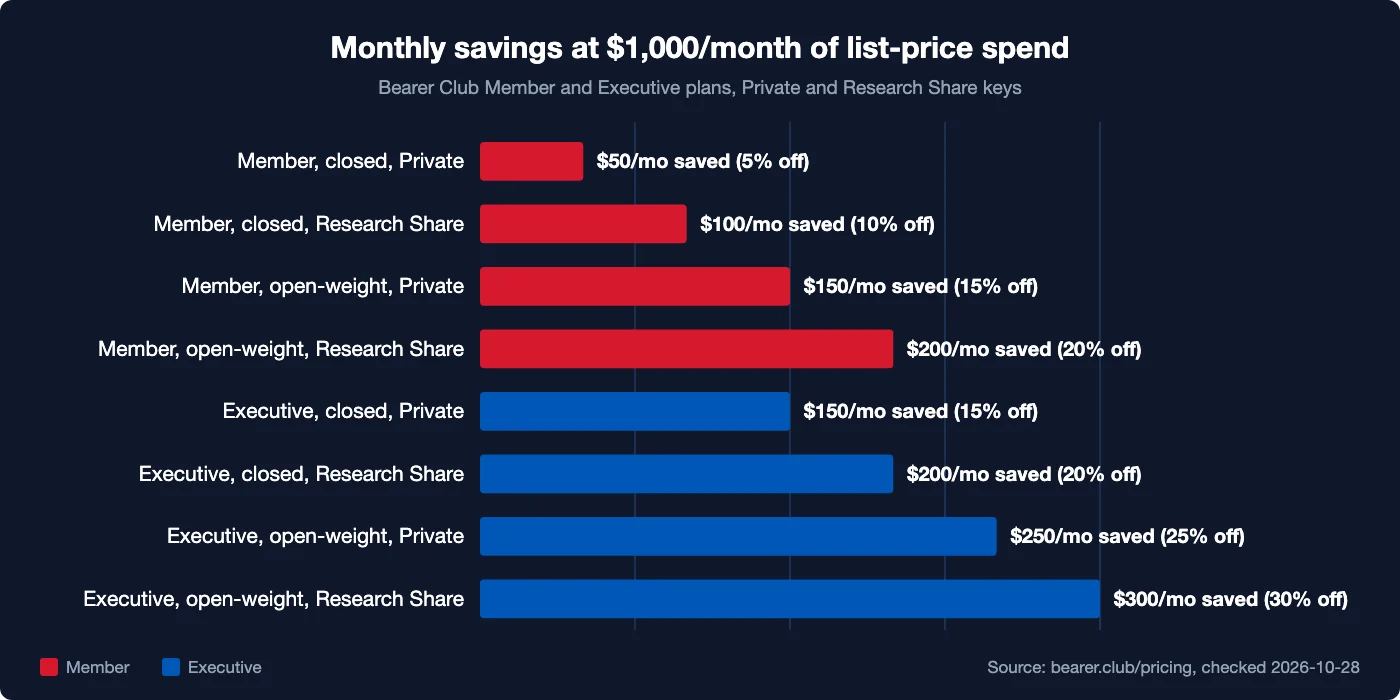
Member plan savings range from $50 to $200 per month at $1,000/month spend. Open-weight models with Research Share extract the most value.
The pricing calculator on bearer.club/pricing lets you enter your actual spend mix to see the exact numbers for your usage.
Frequently asked questions
Does Bearer Club support all OpenAI API endpoints?
No. Bearer Club supports chat completions (including streaming) and the models list. Embeddings, the Assistants API (threads, runs, vector stores), Batch API, fine-tuning, and the Responses API are not available. If your application uses only POST /v1/chat/completions, the switch is complete. If it uses threads or runs, you'll need to keep those calls on the OpenAI endpoint directly.
Can I use this with Cursor, Cline, or Continue?
Yes. Most AI coding tools have a "custom OpenAI-compatible endpoint" setting. Enter https://api.bearer.club/v1 as the base URL and your Bearer Club key as the API key, then use a Bearer Club model ID such as anthropic/claude-sonnet-5-5. Members and Executives can use all 69 models; Guests can use the 33 open-weight models.
What happens to my prompts?
It depends on which data policy you chose when you created the key. Private keys: your request and response content is stored encrypted for 30 days, then deleted. Never used for training. Research Share keys: data may be licensed to AI labs for research. Lowers your price. Full details are at bearer.club/legal/data-sharing.
Is the Guest tier actually free?
Guest accounts have no membership fee and access open-weight models only. You do need to opt into Research Share (Private keys come with a Member or Executive membership). The Guest tier also has an annual usage cap (see pricing) and is not available in the EU, EEA, UK, or Switzerland at launch. For closed models like GPT-6 or Claude, you need a Member or Executive account.
Do model names change across providers?
Yes. Bearer Club model IDs use a provider/model format, for example anthropic/claude-sonnet-5-5 or openai/gpt-6-sol, which can differ from the ID you pass to the provider directly. Check bearer.club/models for the exact IDs before hardcoding model strings.
What if I want to keep calling OpenAI directly for some models?
Run two clients: one pointed at api.openai.com with your OpenAI key, one pointed at api.bearer.club/v1 with your Bearer Club key. Route by model name in your application logic. There's no lock-in either way.
Related posts
Bearer Club is not affiliated with or endorsed by any model provider. Model and provider names are trademarks of their respective owners.